Expired Plate is issued to a New Vehicle
The New Registrations... | Expired Plate is issued to a New Vehicle process is used when a customer wants to put an expired plate, which has not been expired for more than 12 months, onto a new vehicle. For example, a customer has a vanity plate on a vehicle that was due to be renewed in May, but the customer decided not to register the vehicle because it needed work. In July, the customer decides to register a new vehicle they purchased and they want their vanity plate on this new vehicle. To process, from the Motor Vehicle main menu select New Registrations | Expired Plate is issued to a New Vehicle.
A message displays asking, “Is the expired plate being issued to a new vehicle with a blue town clerk copy of the title application (AP)?” If you select Yes, you will advance to the Registration Lookup-Plate Release screen (see Registration Lookup). If you select No, another message will display, “Is the expired plate being issued to a new vehicle from a private sale (PS)?” If you select Yes, you will advance to the Registration Lookup-Plate Release screen. If you select No, another message will display asking, “Is the expired plate being issued to a new vehicle that is title exempt (EX)?” If you select Yes, you will advance to the Registration Lookup-Plate Release screen. If you select No, you should not be processing the registration from this menu selection. You would need to select Plate Release from the Motor Vehicle main menu and then process the registration as New.
Once you’ve answered Yes to one of the above selections, search and select the vehicle (see Registration Lookup). This will bring you to the Plate Release screen. Remember, before you can process a Plate Release, you must contact DMV for their permission, if you are not on their Plate Release program list.
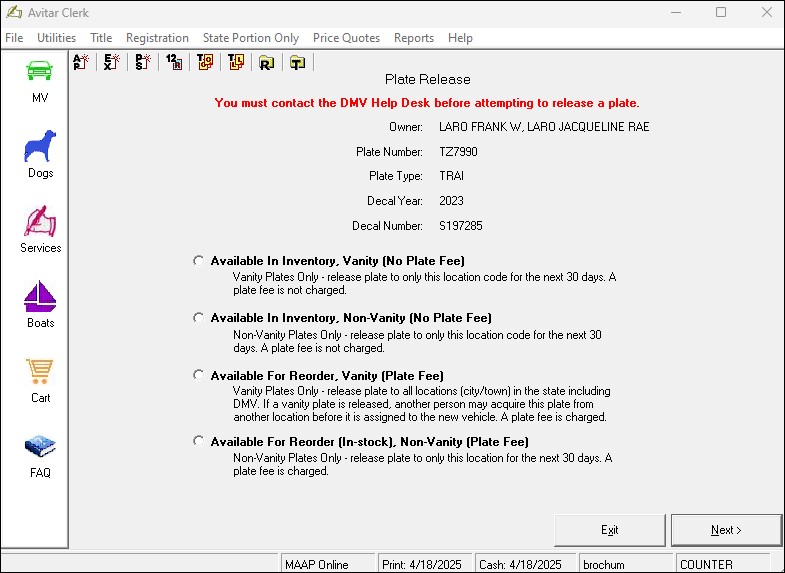
The first two radio buttons are the most common selections. If the plate(s) you are releasing is a vanity, you will select the Available in Inventory, Vanity radio button. If the plate is a Non-Vanity, you will select the Available in Inventory, Non-Vanity radio button. The third option, Available For Reorder, releases the plate(s) to all locations in the State. This means that if you are trying to put a vanity plate onto a new vehicle and you release the plate selecting the third option, someone in another town could take that plate number before you have time to complete the registration. The last, and final option, Available For Reorder (In-Stock), Non-Vanity radio button allows you to release a plate to your town inventory for up to 30 days before it is released and made available to all locations in the state.
Once you have selected the plate release option, click Next. A message will display stating the plates were released successfully. Click OK. Another message will display stating the process is complete. If processing as AP (blue title application copy), you will advance to the Title lookup screen. Search and select the title, which will bring you to the Vehicle Lookup screen (see Vehicle Lookup). Once you have searched and selected the vehicle, the Title AP screen will display. Fill in all pertinent information and click Next to advance to the New Registration screen.
If you are processing as PS (you are generating the title application), you will advance to the Vehicle Lookup screen. Once you have searched and selected the new vehicle information, the Title screen will display. Fill in all pertinent information and click Next to advance to the New Registration screen.
If you are processing as EX (title is not required), you will advance to the Vehicle Lookup screen. Once you have searched and selected the new vehicle information, the New Registration screen will display.
If you are completing the Town/City and State portion of the registration, type in the Decal number. If your system is set to auto populate the next decal (see Default Decals), the Decal text box will automatically populate with your next available decal. After you select Calc Fees, review the information displayed under the Fee Calculation section and click Next to advance to Fee Settlement
Refer to RSA 261:141, VI, Late Renewal